CupertinoDialogAction
Examples
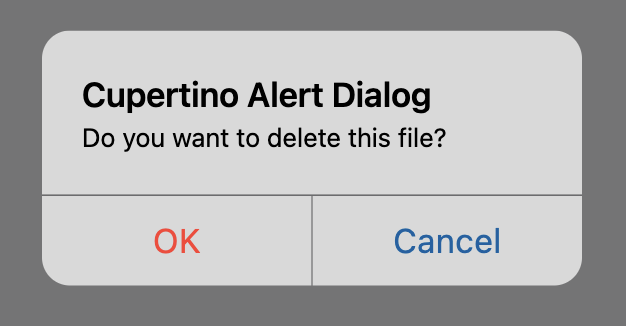
File deletion confirmation
play_arrowTry Online
import flet as ft


def main(page: ft.Page):
    page.horizontal_alignment = ft.CrossAxisAlignment.CENTER

    messages = ft.Column(tight=True)

    def handle_dialog_dismissal(_: ft.Event[ft.DialogControl]):
        messages.controls.append(ft.Text("Dialog dismissed"))

    def handle_action_click(e: ft.Event[ft.CupertinoDialogAction]):
        messages.controls.append(ft.Text(f"Action clicked: {e.control.content}"))
        page.pop_dialog()

    cupertino_alert_dialog = ft.CupertinoAlertDialog(
        title=ft.Text("Cupertino Alert Dialog"),
        content=ft.Text("Do you want to delete this file?"),
        on_dismiss=handle_dialog_dismissal,
        actions=[
            ft.CupertinoDialogAction(
                destructive=True,
                on_click=handle_action_click,
                content="Yes",
            ),
            ft.CupertinoDialogAction(
                default=True,
                on_click=handle_action_click,
                content="No",
            ),
        ],
    )

    page.add(
        ft.SafeArea(
            content=ft.Column(
                horizontal_alignment=ft.CrossAxisAlignment.CENTER,
                controls=[
                    ft.CupertinoFilledButton(
                        on_click=lambda _: page.show_dialog(cupertino_alert_dialog),
                        content="Open CupertinoAlertDialog",
                    ),
                    messages,
                ],
            ),
        )
    )


if __name__ == "__main__":
    ft.run(main)
Cupertino, material and adaptive
play_arrowTry Online
from typing import Union

import flet as ft


def main(page: ft.Page):
    page.horizontal_alignment = ft.CrossAxisAlignment.CENTER
    page.scroll = ft.ScrollMode.AUTO

    messages = ft.Column(tight=True)

    def handle_action_click(
        e: ft.Event[Union[ft.TextButton, ft.CupertinoDialogAction]],
    ):
        messages.controls.append(ft.Text(f"Action clicked: {e.control.content}"))
        page.pop_dialog()

    cupertino_actions = [
        ft.CupertinoDialogAction(
            destructive=True,
            on_click=handle_action_click,
            content="Yes",
        ),
        ft.CupertinoDialogAction(
            default=False,
            on_click=handle_action_click,
            content="No",
        ),
    ]

    material_actions = [
        ft.TextButton(on_click=handle_action_click, content="Yes"),
        ft.TextButton(on_click=handle_action_click, content="No"),
    ]

    page.add(
        ft.SafeArea(
            content=ft.Column(
                horizontal_alignment=ft.CrossAxisAlignment.CENTER,
                controls=[
                    ft.FilledButton(
                        on_click=lambda _: page.show_dialog(
                            ft.AlertDialog(
                                title=ft.Text("Material Alert Dialog"),
                                content=ft.Text("Do you want to delete this file?"),
                                actions=material_actions,
                            )
                        ),
                        content="Open Material Dialog",
                    ),
                    ft.CupertinoFilledButton(
                        on_click=lambda _: page.show_dialog(
                            ft.CupertinoAlertDialog(
                                title=ft.Text("Cupertino Alert Dialog"),
                                content=ft.Text("Do you want to delete this file?"),
                                actions=cupertino_actions,
                            )
                        ),
                        content="Open Cupertino Dialog",
                    ),
                    ft.FilledButton(
                        adaptive=True,
                        bgcolor=ft.Colors.BLUE_ACCENT,
                        on_click=lambda _: page.show_dialog(
                            ft.AlertDialog(
                                adaptive=True,
                                title=ft.Text("Adaptive Alert Dialog"),
                                content=ft.Text("Do you want to delete this file?"),
                                actions=(
                                    cupertino_actions
                                    if page.platform.is_apple()
                                    else material_actions
                                ),
                            )
                        ),
                        content="Open Adaptive Dialog",
                    ),
                    messages,
                ],
            ),
        )
    )


if __name__ == "__main__":
    ft.run(main)
A dialog action button.
Typically used as a child of CupertinoAlertDialog.actions.
Inherits: Control
Properties
content- The content of this action button.default- Whether this action is a default action.destructive- If set toTrue, this button's text color will be red.text_style- The text style to use for text in this button.
Events
on_click- Called when a user clicks this button.
Properties
contentinstance-attribute
content: StrOrControlThe content of this action button.
Raises:
- ValueError - If it is neither a string nor a visible
Control.
defaultclass-attributeinstance-attribute
default: bool = FalseWhether this action is a default action. In this case, the button will have bold text.
Info
Multiple actions can have this property set to True
in a CupertinoAlertDialog.
destructiveclass-attributeinstance-attribute
destructive: bool = FalseIf set to True, this button's text color will be red.
Typically used for actions that destroy objects, such as an delete that deletes an email etc.
Events
on_clickclass-attributeinstance-attribute
on_click: (
    ControlEventHandler[CupertinoDialogAction] | None
) = None
Called when a user clicks this button.